(3 intermediate revisions by the same user not shown)
Line 13:
Line 13:
* Claims can be divided up by typing "'''/flan switchMode'''" to enter sub claim mode, then right clicking the two diagonally opposing corners within the claim. These sub claims can each have their own unique permissions, allowing for example: a communal farm which other players can also use, but a fully protected base within the same claim.
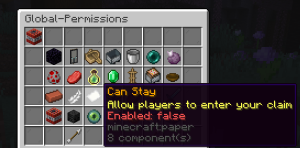
* [[File:Flangetoffmyland.png|thumb|Preventing all players from entering a claim]]Claims can be divided up by typing "'''/flan switchMode'''" to enter sub claim mode, then right clicking the two diagonally opposing corners within the claim. These sub claims can each have their own unique permissions, allowing for example: a communal farm which other players can also use, but a fully protected base within the same claim.
* All other (or specific) players can be kept out of claim completely by setting the paper on the second page in permissions to false.
* All other (or specific) players can be kept out of claim completely by setting the paper on the second page in permissions to false.
Tip: If you find that you do not have enough claims for all your builds, consider teaming up with another player you trust to share claims.
Tip: If you find that you do not have enough claims for all your builds, consider teaming up with another player you trust to share claims.
Latest revision as of 21:08, 17 February 2025
Aetheria uses Flan for land claiming. Players can have up to 5 total claims, with the number of claim blocks earnt through playtime at a rate of 1/600 ticks up to a maximum of 25,000 blocks. Players can view their claim coordinates by typing "/flan list". Note that claims cannot be teleported to, so it is recommended to create a home using "/sethome [name]".
Starter Guide
We advise that players claim all of their own builds and chests to avoid being griefed or raided.
To claim an area, right click the two opposing corners with a golden hoe.
An existing claim can be expanded by right clicking a corner with a golden hoe, then right clicking the block to expand it to.
Right clicking the ground with a stick shows the current claim borders and who owns it.
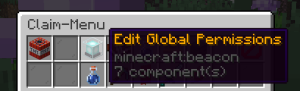
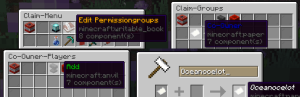
Accessing Global PermissionsBy using "/flan menu" players can add users to their claim and give them specific permissionsAdding a player to the Co-Owner group
Left clicking the beacon allows editing the claim's global permissions. This changes what everyone on the server can do in the claim.
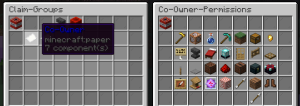
Players can be added to specific permission groups by clicking the book and quill, left clicking the paper group name, left clicking the anvil, then typing in the player's username - alternatively, players can give another full permissions by standing in the claim and simply typing "/trust [username]".Altering Permissions for the Co-Owner group
Specific group permissions can be altered by right clicking the paper group name. This allows full control of exactly what individual players can and cannot do in your claim.
Preventing all players from entering a claimClaims can be divided up by typing "/flan switchMode" to enter sub claim mode, then right clicking the two diagonally opposing corners within the claim. These sub claims can each have their own unique permissions, allowing for example: a communal farm which other players can also use, but a fully protected base within the same claim.
All other (or specific) players can be kept out of claim completely by setting the paper on the second page in permissions to false.
Tip: If you find that you do not have enough claims for all your builds, consider teaming up with another player you trust to share claims.